PS3 SFO Editor Linux Edition is a Linux graphical interface that displays and allows editing PS3 PARAM.SFO files. This one contains no Sony code so it's a homebrew that's 100% free. External content (video or audio) hidden: it sets its own cookies.Features:
- Simple to use interface.
- Ability to modify all parameters in PARAM.SFO. This means you can edit: Version, App. Version, Title ID, Default Title, Localized Titles, Parental control level, Required Firmware, Online ID (if present), Category, Video Resolution, Audio Formats and Remote Play option.
- Ability to view a grid displaying all keys and actual values of the PARAM.SFO file. Download
I developed a small command line C program that allows editing PARAM.SFO files on linux (theoretically compilable on windows, solaris...).
Tested on ubuntu 10.04 x64.
For example, by putting the "sfo" binary file in the PARAM.SFO directory, just type:
./sfo -f PARAM.SFO -w title_id -c BLES00683
and it's modified
you can check by typing
./sfo -f PARAM.SFO -l or ./sfo -f PARAM.SFO -r title_id
You can modify a whole bunch of values.
For now it's an Alpha version, so lots of bugs and not yet fully finalized so back up your SFO files before doing anything...
PS3 SFO Editor Linux Edition est une interface graphique Linux qui affiche et permet l'édition des fichiers PARAM.SFO PS3. ce dernier ne contient pas de code Sony donc c'est un homebrew gratuit à 100%. External content (video or audio) hidden: it sets its own cookies.Fonctionnalités:
- Interface simple d'utilisation.
- Possibilité de modifier tous les paramètres dans PARAM.SFO. Cela signifie que vous pouvez éditer: Version, App. Version, Title ID, Default Title, Titres localisés, Niveau de blocage parental, Firmware requis, ID Online (si présent), Catégorie, Résolution Vidéo, Formats Audio et option Remote Play.
- Possibilité de visualiser une grille affichant l'ensemble des clés et valeurs effectives du fichier PARAM.SFO. Téléchargement
j'ai développé un petit programme C en ligne de commande qui permet d'éditer les fichiers PARAM.SFO sous linux (théoriquement compilable sous windows, solaris...).
Testé sous ubuntu 10.04 x64.
Par exemple en mettant le fichier binaire "sfo" dans le répertoire du PARAM.SFO, il suffit de taper :
./sfo -f PARAM.SFO -w title_id -c BLES00683
et c'est modifié
on peut vérifier en tapant
./sfo -f PARAM.SFO -l ou ./sfo -f PARAM.SFO -r title_id
On peut modifier tout un tas de valeurs.
Pour l'instant c'est une version Alpha, donc beaucoup de bugs et pas encore completement finalisée alors sauvegardez vos fichier SFO avant toute manipulation...
Red Squirel CONGRATULATIONS!!
but what's the point of modifying Remote Play?
Will we be able to play with our PSPs our ps3 games... (like LAIR)???
if so I say! LONG LIVE THE REVOLUTION!!!
Red Squirel FÉLICITATION !!!
par contre a quoi sert de modifier Remote Play ?
Pourra t-on jouer avec Nos PSP à nos jeux ps3... (comme LAIR) ???
si oui je dit ! QUE VIVA LA RÉVOLUTION !!!
darkscad wrote:Red Squirel CONGRATULATIONS!!
but what's the point of modifying Remote Play?
Will we be able to play with our PSPs our ps3 games... (like LAIR)???
if so I say! LONG LIVE THE REVOLUTION!!!
Yes that's the case but it's old news!!! all the games.
darkscad wrote:Red Squirel FÉLICITATION !!!
par contre a quoi sert de modifier Remote Play ?
Pourra t-on jouer avec Nos PSP à nos jeux ps3... (comme LAIR) ???
si oui je dit ! QUE VIVA LA RÉVOLUTION !!!
Tgames only uses the cookies the board needs (login, preferences). Embedded videos and audio (YouTube, Dailymotion, SoundCloud…) set their own cookies: they are only loaded with your consent. Learn more

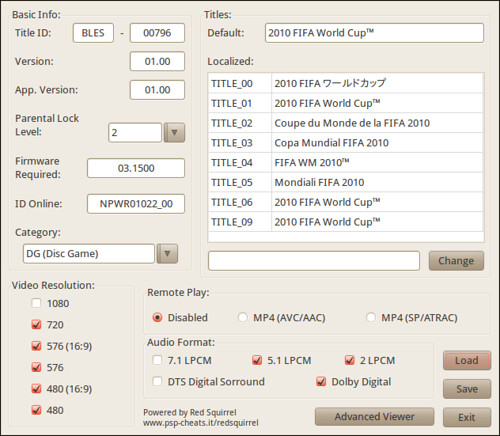 PS3 SFO Editor Linux Edition is a Linux graphical interface that displays and allows editing PS3 PARAM.SFO files. This one contains no Sony code so it's a homebrew that's 100% free.





 Everything for PS5 · PS4 · PS3