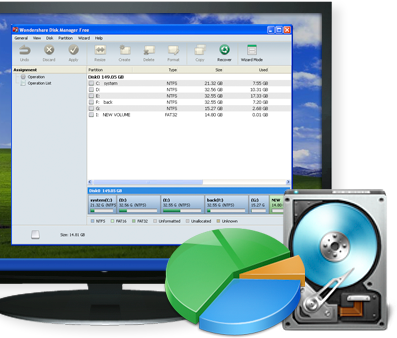
Wondershare Disk Manager Free is a utility
free that allows you to
create, resize, copy, format, delete partitions on your hard drive.
Although in English, its interface remains very accessible and easy to use, for anyone

Wondershare Disk Manager Free also allows you to recover
a lost partition, convert a FAT partition to NTFS or vice versa, hide or display a partition, etc.
For beginners, a wizard will guide you step by step through each step

Available for free, Wondershare Disk Manager Free is a utility that allows you to create, resize, copy, format, delete partitions on your hard drive.
Although in English, its interface remains very accessible and easy to use.
Main features:
-Create a partition: Create a new partition or re-partition your hard drive for better use.
-Resize partition: Extend a partition to a larger size or reduce a partition without losing data.
-Copy the partition/disk : Copy a partition / disk as well as all its files for backup. You can save the copy to another partition or storage device.
-Delete the partition: Delete a partition or delete all partitions. You can choose to shred the partition data.
-Format the partition : Prepare to install an OS or reorganize your hard drive.
-Recover the partition : recover lost partitions as well as the files it contains from misoperation, software / hardware failure, or virus attack.
-Set Active Partition: Your computer will start from the active partition.
-Hide / Partition : Make your partition invisible and sensitive to prevent unauthorized access.
-Explore partition: You can view the structure of the selected partition, but the content of the files is not displayed.
-Change volume label: allow you to change your volume name by right-clicking the mouse and selecting Advance.
Platform:
Windows 7/XP/Vista (32-bit)
Source
Wondershare Disk Manager Free est un utilitaire
gratuit qui vous permet de
créer, redimensionner, copier, formater, supprimer des partitions sur votre disque dur.
Bien qu’en anglais, son interface reste très accessible et simple d’utilisation, pour n'importe qui
Wondershare Disk Manager Free permet également de récupérer
un partition perdue, de convertir une partition FAT en NTFS ou vice-versa, de cacher ou non une partition, etc.
Pour les novices, un assistant vous guidera pas à pas pour chaque étape
Disponible gratuitement, Wondershare Disk Manager Free est un utilitaire permettant de créer, redimensionner, copier, formater, supprimer des partitions sur votre disque dur.
Bien qu’en anglais, son interface reste très accessible et simple d’utilisation.
Fonctions principales:
-Créer une partition : Créer une nouvelle partition ou ré-partition de votre disque dur pour une meilleure utilisation.
-Redimensionner partition : Étendre une partition à une taille supérieure ou de réduire une partition sans perdre de données.
-Copier la partition/disque : Copie d'une partition / disque ainsi que tous ses fichiers pour la sauvegarde. Vous pouvez sauvegarder la copie sur une autre partition ou un autre périphérique de stockage.
-Supprimer la partition : Supprimer une partition ou supprimer toutes les partitions. Vous pouvez choisir de déchiqueter les données de la partition.
-Format de la partition : Préparer pour installer un OS ou réorganiser votre disque dur.
-Récupérer la partition : récupérer des partitions perdues ainsi que les fichiers qu'il contient à partir misoperation, logiciel / matériel échec, ou attaque de virus.
-Set Active Partition : Votre ordinateur va démarrer à partir de la partition active.
-Cacher / Partition : Faites votre partition invisible et sensibles d'éviter tout accès non autorisé.
-Explorez partition : Vous pouvez visualiser la structure de la partition sélectionnée, mais le contenu des fichiers ne s'affiche pas.
-Changement d'étiquette de volume : vous permettre de changer votre nom de volume par la souris clic droit et sélectionnez Advance.
Plateforme:
Windows 7/XP/Vista (32 bits)
Source

 Everything for PC