SoulHeaven and Librasoft present their DNA: the X360Dual Nand Addon. As its name suggests, coupled with an X360GlitchChip (V1.4 or 2.1) it will let you access two Nands via your console (Glitch/Retail for example). For a price around 22€ or so! Available within two weeks and already available for pre-order on some sites!
Here's a video from SoulHeaven: External content (video or audio) hidden: it sets its own cookies.
As well as his "press release":
Here are the features of the x360DNA v1:
- No trace cutting for the CE, nor pin lifting on the nand
- Automatic management of disabling the Glitch chip with the x360Glitchip v1.4 and x360Glitchip v2.1
- No lame clip
- A real good quicksolder for a simple and robust installation for Slim (For FAT a wired installation is needed)
- Super simple selection via the sync button
- No button on the outside
- No need to hold the sync button for long seconds during startup
- Automatic SMC Reset management
- No useless built-in SPI that would raise the final price
- Wires provided and pre-soldered on the chip
And a few exclusive features:
- Write protection function for the nand for the paranoid (easily disabled even with the console on)
- Nand hot swap function, to switch nand without risk, even with the console on. (For experts)
Coupled with an x360Glitchip v2.1, you'll have the simple choice of putting your clean nand on the internal nand or the external nand.
Usage is ULTRA simple.
Console off:
Press the sync button once, an LED on the ROL lights up indicating you're on the external nand.
Press the sync button again once, the LED turns off, you switch back to the internal nand.
So choosing the nand comes down to pressing the sync button, then the power button to turn on the console
Console on:
Press the sync button for about 4s, an LED on the ROL lights up, you can release. You've just switched to STDBY mode:
- If it's steady, it means you're on the external nand
- If it's blinking it means you're on the internal nand
A simple press of the sync button switches your nand on the fly.
Press again for 4s to exit STDBY mode.
Please note, that in STDBY mode, the nands are no longer write protected. When exiting STDBY mode, they are protected again.
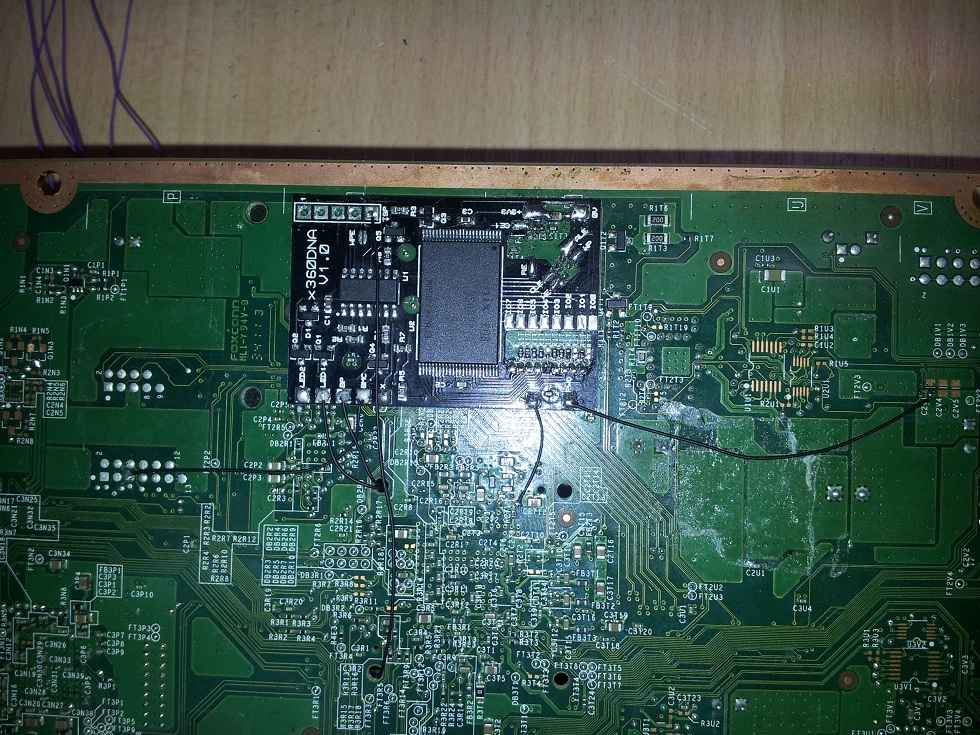
Here's a little photo of the DNA installed on a Xbox 360 Slim: Source
SoulHeaven et Librasoft nous présente leur DNA : Le X360Dual Nand Addon. Comme son nom l'indique, accouplé à une X360GlitchChip (V1.4 ou 2.1) elle vous permettra d'avoir un accès à deux Nands via votre console (Glitch/Retail par exemple). Pour un prix au alentour de 22€ environ ! Disponible d'ici deux semaines et en pré-commande sur certains sites déjà !
Voici une vidéo de SoulHeaven : External content (video or audio) hidden: it sets its own cookies.
Ainsi que son "communiqué" :
Voici les fonctionnalités du x360DNA v1 :
- Pas de coupure de piste pour le CE, ni de patte à lever sur la nand
- Gestion automatique de la désactivation de la puce Glitch avec les x360Glitchip v1.4 et x360Glitchip v2.1
- Pas de clip à la con
- Un vrai bon quicksolder pour une installation simple et robuste Pour Slim (Pour FAT une installation filaire est nécessaire)
- Sélection super simple via le bouton de synchronisation
- Pas de bouton à l'extérieur
- Pas besoin de rester de longue secondes sur le bouton de synchronisation lors du démarrage
- Gestion du SMC Reset automatique
- Pas de SPI inutile intégré qui augmenterait le prix final
- Des fils fournis et pré-soudés sur la puce
Et quelques fonctionnalités exclusives :
- Fonction de protection en écriture de la nand pour les paranos (Facilement désactivable même console allumée)
- Fonction de nand hot swap, pour basculer de nand sans risque, même console allumée. (Pour expert)
Couplé avec une x360Glitchip v2.1, vous aurez le choix simple de mettre votre nand clean sur la nand interne ou sur la nand externe.
L'utilisation est ULTRA simple.
Console éteinte :
Appuyez une fois sur le bouton de synchro, une led sur le ROL s'allume indiquant que vous êtes sur la nand externe.
Appuyez de nouveau une fois sur le bouton de synchro, la led s'éteint vous basculez à nouveau sur la nand interne.
Le choix de la nand se résume donc à une pression sur le bouton synchro, puis sur le bouton power pour allumer la console
Console allumée :
Appuyez environ 4s sur le bouton de synchro, une led sur le ROL s'allume, vous pouvez relâcher. Vous venez de passer en mode STDBY :
- Si celle-ci est fixe, c'est que vous êtes sur la nand externe
- Si celle-ci clignote c'est que vous êtes sur la nand interne
Une simple pression sur le bouton de synchro vous fait changer de nand à chaud.
Appuyez à nouveau 4s pour sortir du mode STDBY.
Veuillez noter, que dans le mode STDBY, les nands ne sont plus protégées en écriture. En sortant du mode STDBY, celles-ci sont à nouveau protégées.
Ainsi qu'une petite photo du DNA installé sur une Xbox 360 Slim : Source
Last edited by MamieSophie on Tue 22 May 2012 10:43, edited 1 time in total.
Reason:Corrigé!
Tgames only uses the cookies the board needs (login, preferences). Embedded videos and audio (YouTube, Dailymotion, SoundCloud…) set their own cookies: they are only loaded with your consent. Learn more

 Source

 Everything for Xbox