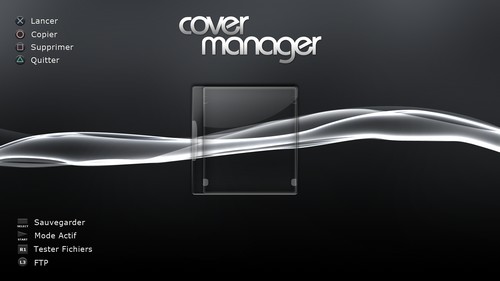
Cover Manager R9 Image unavailable (removed by its host) phabrissse offers a version with a French skin of Cover Manager R5
Changelog:Spoiler
R9
Preview 2:
patches game sys versions down to 2.40 for people using MOH etc
R8
* Improved scrolling speed by displaying only one cover.
* Downloads now point to the 3D covers folder (normally "/covers/3d/").
* A few other not very important changes.
R5
Fix: Cover now displayed for BD game
Fix: BD Game text color different
Fix: Ansi correction for some utf-8 characters
Fix: # of games moved
compatibility: Jurai says that patch mode (for non-hermesv3-updated devices) works @ every peek/poke compatible devices)
Change log R5
Compiled with 3.41 SDK
includes updated FTP library which is a bit more stable than the old version
Change log R3:
Added dialogs to alert you to whether a cover was available or not as people were confused
Change log R2:
Added HTTP downloading of covers, press L1 when highlighting a missing cover and it will attempt to download it. 224 covers are currently available.
- http downloading is not launched in a thread, as such app will seem to lock up while it does the downloading, give it time
Title text is now centered on the screen
- some text may 'appear' to be uncentered even though it is, due to additional non-ansi trailing text (trademark symbols, etc)
Display # of games on bottom right
Change log R1:
needs better memory management.
covers go in /dev_hdd0/games/OMAN46756/covers/ and are by title id, ex BCUS12345.png
need to be 348×400
Notes:
- The HTTP download isn't run as a task, so the app may freeze slightly during the download, just give it time.
- Titles are now centered on the screen.
- Some text may still appear off-center, this is due to special characters.
- Display of the # of the game in the bottom right. Download
Cover Manager R9 phabrissse propose une version avec skin français de Cover Manager R5
Changlog :Spoiler
R9
Preview 2:
patches game sys versions down to 2.40 for people using MOH etc
R8
* Amélioration de la vitesse de défilement en affichant qu'une seule jaquette.
* Les téléchargements pointent vers le dossier des jaquettes 3D (normalement "/covers/3d/").
* Quelques autres modifications pas très importantes.
R5
Fix: Cover now displayed for BD game
Fix: BD Game text color different
Fix: Ansi correction for some utf-8 characters
Fix: # of games moved
compatibility: Jurai says that patch mode (for non-hermesv3-updated devices) works @ every peek/poke compatible devices)
Change log R5
Compiled with 3.41 SDK
includes updated FTP library which is a bit more stable than the old version
Change log R3:
Added dialogs to alert you to whether a cover was available or not as people were confused
Change log R2:
Added HTTP downloading of covers, press L1 when highlighting a missing cover and it will attempt to download it. 224 covers are currently available.
- http downloading is not launched in a thread, as such app will seem to lock up while it does the downloading, give it time
Title text is now centered on the screen
- some text may ‘appear’ to be uncentered even though it is, due to additional non-ansi trailing text (trademark symbols, etc)
Display # of games on bottom right
Change log R1:
needs better memory management.
covers go in /dev_hdd0/games/OMAN46756/covers/ and are by title id, ex BCUS12345.png
need to be 348×400
Notes :
- Le téléchargement HTTP n'est pas lancé en temps que tâche, donc l'application pourra légèrement freezer pendant le téléchargement, laissez-lui juste le temps.
- Les titres sont maintenant centrés sur l'écran.
- Quelques textes peuvent toujours apparaitre comme décentrés, cela est du aux caractères spéciaux.
- Affichage du # du jeu en bas à droite. Téléchargement
I'm going to be greedy with you guys but well again thanks to you and other members for the info, downloads that you give for the ps3, only I'm not that great with computers, I manage but it would be cool of you to give us the steps to follow, for example on this homebrew because I don't know how to install the covers over http, on the wii it was simple, just download jaquette and there you go!!! we have everything here on our forum thanks to your work, and again thanks for the time you spend on this (no no I'm not a su... ) basically some tutorials are missing
je vais étre gourmand avec vous mais bon encore une fois merci a toi et autre autre membre pour les infos,telechargement que vous donné pour la ps3,seulement je suis pas trop fort en informatique je me débrouille et ça serait cool de votre part de nous donner la marche a suivre,par exemple sur cette homebrew car je sais pas comment on fait pour installer les covers en http,sur la wii c'était simple il suffisait de faire telecharger jaquette et hop!!!on a tout ici sur notre forum grace a votre travail et encore une fois merci pour le temps que vous passez dessus(non non je suis pas un su... ) en gros manque des tutos
votre ps3 vous appartient,faite en ce que vous voulez!!!!
arnauto wrote:I'm going to be greedy with you guys but well again thanks to you and other members for the info, downloads that you give for the ps3, only I'm not that great with computers, I manage but it would be cool of you to give us the steps to follow, for example on this homebrew because I don't know how to install the covers over http, on the wii it was simple, just download jaquette and there you go!!! we have everything here on our forum thanks to your work, and again thanks for the time you spend on this (no no I'm not a su... ) basically some tutorials are missing
For my part I'm already working on a tutorial for Jiiwah so it's not going to be right away but it'll come soon.
arnauto wrote:je vais étre gourmand avec vous mais bon encore une fois merci a toi et autre autre membre pour les infos,telechargement que vous donné pour la ps3,seulement je suis pas trop fort en informatique je me débrouille et ça serait cool de votre part de nous donner la marche a suivre,par exemple sur cette homebrew car je sais pas comment on fait pour installer les covers en http,sur la wii c'était simple il suffisait de faire telecharger jaquette et hop!!!on a tout ici sur notre forum grace a votre travail et encore une fois merci pour le temps que vous passez dessus(non non je suis pas un su... ) en gros manque des tutos
Pour ma part je suis déjà sur un tuto pour Jiiwah alors c'est pas pour tout de suite mais ca viendras bientôt .
arnauto wrote:thanks, how do we do it? no but quickly without going into the details
you put it on a usb device you install (I think you already know that ) you launch it and personally I copy my games into OmanXXXXX I just tested it, it's coming together I love the skin it's not the same as in the photo, the R8 one is really classy. for the covers I haven't tested but I'll run some tests tonight, if you're around I'll keep you posted ++
arnauto wrote:merci,on fait comment?non mais vite fait sans rentrer dans les détails
tu met sur un périphérique usb tu installe (je pense que tu le sais déja ) tu lance et pour moi je copie mes jeux dans OmanXXXXX je viens de le testé ça prend forme j'adore le skin c'est pas le même que sur la photo celui du R8 est vraiment classe . pour les covers j'ai pas testé mais je ferais des tests ce soir si t'es la je te tiens au courant ++
Tgames only uses the cookies the board needs (login, preferences). Embedded videos and audio (YouTube, Dailymotion, SoundCloud…) set their own cookies: they are only loaded with your consent. Learn more

 Download



 ) basically some tutorials are missing


 ) you launch it and personally I copy my games into OmanXXXXX I just tested it, it's coming together I love the skin
 Everything for PS5 · PS4 · PS3