

Full Game Atlantis: The Lost Tales for Windows 10 without any bug or issue in-game!
Full game version of Atlantis: The Lost Tales for Windows 10 without any bug or problem in-game!
Code: Select all
Atlantis: The Lost Tales (Cryo 1997) "Perfect Edition" V1.1 by Tgames
------------------------------------------------------------------
ENGLISH PART :

This version of Atlantis is the perfect version of the game (from the DVD edition, without all the bugs of the CD editions).

Modified by Tgames in order to no use anymore the DVD and get savegames working.

This version doesn't have the guards bugs, no sfx bugs neither.
It works perfectly when the player reach the hangar and saves are working.

NO CD to mount, just extract everything to C:\ hardrive.


Setup :
--------------

0) Extract the zip to the root of C:
It must be C:\CRYO\ATLANTIS\
OR if you choose another folder and drive letter (like D:\CRYO\ATLANTIS\) you MUST do THAT :

<!> EDIT "SETUP.REG" before playing the game ! <!>

Change :

@="C:\\CRYO\\ATLANTIS"

by the drive letter you have extract the game and the path to the game .exe.

For example :
Drive : D:
Path to the game : D:\CRYO\ATLANTIS\ATLANTIS.EXE

@="D:\\CRYO\\ATLANTIS"

1) Launch setup.reg
2) Set Atlantis.exe as "Launch as Administrator".
3) Launch Atlantis.exe !

PARTIE FRANCAISE :

ette version d'Atlantis est la version parfaite du jeu (tirée de celle DVD, dépourvu de tous les bugs présents sur CD).

Modifiée par Tgames afin d'être utilisable sans le DVD et que les sauvegardes fonctionnent.

Cette version n'a pas le bug des gardes, ni des bruitages.
Elle fonctionne parfaitement au passage au hangar et a bien les sauvegardes fonctionnelles.

Elle ne nécessite AUCUN CD, ni rien à monter, simplement extraire le tout dans le lecteur C:\


Installation :
--------------

0) Extraire l'archive au root du lecteur C:
Celà doit donner C:\CRYO\ATLANTIS\
OU si vous choissisez un autre dossier et lettre de disque dur (comme D:\CRYO\ATLANTIS\)
vous DEVEZ faire CELA :

<!> MODIFIEZ LE FICHIER "SETUP.REG" avant de jouer au jeu ! <!>

Changez :

@="C:\\CRYO\\ATLANTIS"

par la lettre de lecteur et le chemin (jusqu'au .exe) où vous avez extrait le jeu.

Par exemple :
Lecteur : D:
Chemin jusqu'au jeu : D:\CRYO\ATLANTIS\ATLANTIS.EXE

@="D:\\CRYO\\ATLANTIS"

1) Lancez setup.reg
2) Mettre Atlantis.exe en lancement mode Administrateur.
3) Lancez Atlantis.exe !

(C) Tgames 2018
https://www.tgames.fr-> Missing sounds in English Cinematics Fixed!
-> Memory error when entering in the Hangar Fixed!
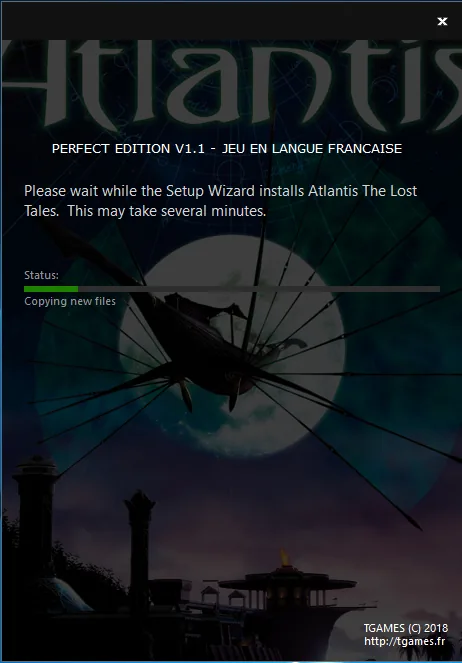
NEW VERSION (ALL-IN-ONE SETUP per languages) / NEW VERSION (ALL-IN-ONE per languages)
For Windows 7, Windows 8, Windows 8.1 & Windows 10

FRENCH VERSION (SETUP VERSION):
Note: Simply launch the setup, select the wrapper you want and play!
From now on, no manipulation needed!
This content is for members only. Log in or register for free to see it.
ENGLISH VERSION (SETUP VERSION):
Note: Just launch the setup, select the wrapper you want and play!
Nothing more to do!
This content is for members only. Log in or register for free to see it.
SPANISH VERSION (SETUP VERSION):
Note: Just launch the setup, select the wrapper you want and play!
Nothing more to do!
This content is for members only. Log in or register for free to see it.
ZIP VERSIONS (For old Windows 98/ME/2000/XP/Vista)
ENGLISH VERSION (UPDATED TO V1.1):
This content is for members only. Log in or register for free to see it.
FRENCH VERSION (UPDATED TO V1.1):
This content is for members only. Log in or register for free to see it.
SPANISH VERSION (UPDATED TO V1.1):
This content is for members only. Log in or register for free to see it.
SUPPORT/TECHNICAL PART (ONLY IF METHOD 1 AND METHOD 2 OF THE SETUP ARE NOT WORKING FOR YOU)
WARNING: If you encounter any crash during gameplay, your PC Setup is not 100% compatible with dgVoodoo2. So you will need to install this fix (thanks to ddwrapper to force the game to runs to 30fps).
DON'T USE IT IF YOU DON'T HAVE ANY PROBLEM! Because you will loose the 1080p and texture filtering support
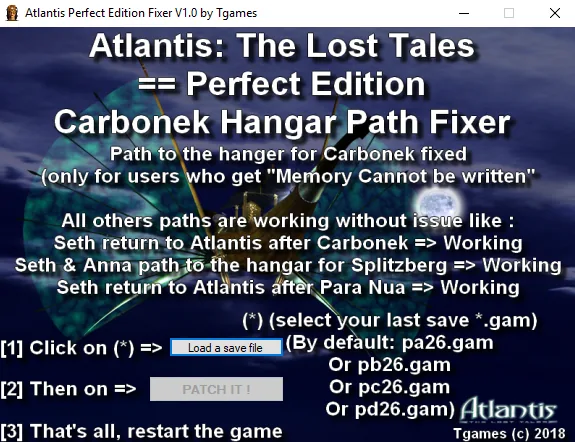
ATLANTIS: THE LOST TALES (PERFECT EDITION) FIXER FOR WINDOWS 10!
ONLY IF YOU ENCOUNTER CRASH/FREEZE DURING GAMEPLAY! If it's not the case, you don't need it!
Code: Select all
1) Reinstall the game completely
2) Remove any exe/dll in the folder of ATLANTIS (except ATLANTIS.EXE, CRYO.DLL, MSS32.DLL)
3) Click right on ATLANTIS.EXE
4) Set :
- Run this program in compatibility mode : Windows 98
- Reduced color mode : 16-bit (65536) color
4) Extract this zip into ATLANTIS folder (ONLY if you want the 30fps):
https://www.tgames.fr/fichier/toqnr7jmuG
4) Run the game from ATLANTIS.EXE
5) The game should now run without any crash at 4 :3 resolution and 30fps forced ! This content is for members only. Log in or register for free to see it.
NEW 2019/NEW 2019
UPDATE You can now update to Extended's Cut Editon from Perfect Edition to support new features (new dialogues, cutscenes, music and modes) and better support for Windows 10.
You can now update to the Extended Cut from the Perfect Edition version to get new features (new dialogues, cutscenes, music and modes) and better support for Windows 10.
ENGLISH V1.0 R1009 TEST VERSIONThis content is for members only. Log in or register for free to see it.FRENCH V1.0 R1009 TEST VERSIONThis content is for members only. Log in or register for free to see it.






 Everything for PC