
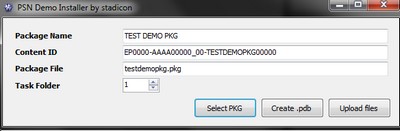
 stadicon has released a new PC utility that will let you create .pdb files in order to install PS3 demos on your console via FTP.
Features:
- Creation of .pdb files
- Uploading files to your PS3 via FTP
Requirements
- .Net Framework 2.0
- PS3 FTP Server
Usage:
Spoiler
You can use this tool in 2 ways:
1) Create .pdb files and upload them via an external FTP client (e.g.: Filezilla)
2) Let the utility create and upload everything directly to your PS3
1) Create .PDBs
—————
1) Launch PSN Demo Installer
2) Press the “Select PKG” button to fill in the Content ID and Package File name fields (you can also enter this information manually, but it's advisable to pull it from a PKG)
3) Enter the Package Name (the name of the demo as it appears on the XMB before installation)
4) Select a number for the Task Folder field (based on this choice, you should pick the final destination folder on your PS3)
5) Press “Create .pdb” and choose a folder. 3 files will then be created: d0.pdb, d1.pdb, f0.pdb.
6) Use an external FTP client (e.g.: Filezilla) to transfer these 3 files and the .pkg via PS3 FTP Server into /dev_hdd0/vsh/task/0000000x (x = corresponds to the number you previously selected in the Task Folder field).
7) Once the files are on your PS3, simply restart your console (without PSJailbreak/PSGroove/PSFreedom) and you'll find an option to install the demo.
2) Create and upload the files
1) Launch PSN Demo Installer
2) Press the “Select PKG” button to fill in the Content ID and Package File name fields
3) Enter the Package Name (the name of the demo as it appears on the XMB before installation)
4) Select a number for the Task Folder field (you can leave this at 1, the uploader will change it automatically)
5) Press the “Upload Files” button and the FTP dialog box should appear
6) Enter your PS3's IP address. Make sure PS3 FTP Server is running on your console.
7) Press the “Upload” button and wait until the files finish uploading.
8) Once the files have been transferred (check the logs), restart your PS3 (without PSJailbreak/PSGroove/PSFreedom) and you'll find an option to install the demo.
Warning: the “Create and upload the files” option is easy to use, however the FTP library implemented in the application isn't as fast as an external FTP client. You may run into lag issues or errors with large PKGs (1GB+) because of the FTP server, which remains buggy.
1) Create .pdb files and upload them via an external FTP client (e.g.: Filezilla)
2) Let the utility create and upload everything directly to your PS3
1) Create .PDBs
—————
1) Launch PSN Demo Installer
2) Press the “Select PKG” button to fill in the Content ID and Package File name fields (you can also enter this information manually, but it's advisable to pull it from a PKG)
3) Enter the Package Name (the name of the demo as it appears on the XMB before installation)
4) Select a number for the Task Folder field (based on this choice, you should pick the final destination folder on your PS3)
5) Press “Create .pdb” and choose a folder. 3 files will then be created: d0.pdb, d1.pdb, f0.pdb.
6) Use an external FTP client (e.g.: Filezilla) to transfer these 3 files and the .pkg via PS3 FTP Server into /dev_hdd0/vsh/task/0000000x (x = corresponds to the number you previously selected in the Task Folder field).
7) Once the files are on your PS3, simply restart your console (without PSJailbreak/PSGroove/PSFreedom) and you'll find an option to install the demo.
2) Create and upload the files
1) Launch PSN Demo Installer
2) Press the “Select PKG” button to fill in the Content ID and Package File name fields
3) Enter the Package Name (the name of the demo as it appears on the XMB before installation)
4) Select a number for the Task Folder field (you can leave this at 1, the uploader will change it automatically)
5) Press the “Upload Files” button and the FTP dialog box should appear
6) Enter your PS3's IP address. Make sure PS3 FTP Server is running on your console.
7) Press the “Upload” button and wait until the files finish uploading.
8) Once the files have been transferred (check the logs), restart your PS3 (without PSJailbreak/PSGroove/PSFreedom) and you'll find an option to install the demo.
Warning: the “Create and upload the files” option is easy to use, however the FTP library implemented in the application isn't as fast as an external FTP client. You may run into lag issues or errors with large PKGs (1GB+) because of the FTP server, which remains buggy.
This content is for members only. Log in or register for free to see it.
Source: Gx Mod

 Everything for PS5 · PS4 · PS3