
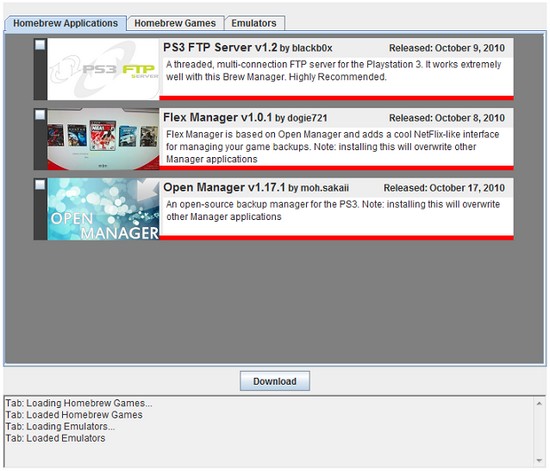
 After PSN PKG Downloader, which lets you download and install free PSN content without access to it (if you're using a jailbroken PS3), Brewology strikes again, this time with an online Java application that lets you install the latest Homebrews/Games/Emulators directly on your PS3.
Working via a Java applet (and therefore compatible with many platforms that allow web browsing), all you'll need is an FTP server installed on your PS3 to allow the installation of the homebrews of your choice.
Features:
- Multi-platform (Windows, Linux, OS X) thanks to the use of a Java applet.
- Downloads directly to your PS3
Usage:
Spoiler
1) First, install PS3 FTP Server on your PS3 and launch it.
2) From your PC, go to https://ps3.brewology.com/homebrew/ and choose what you're looking for.
3) Click the link and wait for the Java applet to start.
4) Allow the Java applet to run and wait for it to load. Fill in the fields.
5) Press "Download" and wait.
6) Once the download is finished, quit PS3 FTP Server, and you should then see what you just downloaded on the XMB.
2) From your PC, go to https://ps3.brewology.com/homebrew/ and choose what you're looking for.
3) Click the link and wait for the Java applet to start.
4) Allow the Java applet to run and wait for it to load. Fill in the fields.
5) Press "Download" and wait.
6) Once the download is finished, quit PS3 FTP Server, and you should then see what you just downloaded on the XMB.
Source
 Everything for PS5 · PS4 · PS3