PSN PKG Downloader
Brewology launches an online tool for PS3 that will let you download and install free PSN content without access to it (if you're using a Jailbroken PS3).
Features:
- Multi platform (Windows, Linux, OS X) thanks to the use of a Java applet.
- Direct download to your PS3
- Automatic generation of PDB files.
- Creation of the folder structure
Usage:
1) First install PS3 FTP Server on your PS3 and launch it.
2) From your PC, go to https://ps3.brewology.com/psn and choose what you're looking for: games, demos, trailers,…
3) Click on the link and wait for the Java applet to launch.
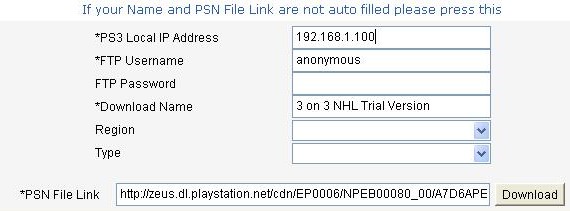
4) Accept the Java applet execution and wait for it to load. Fill in the fields.
5) Press "Download" and wait.
6) Once the download is finished, quit PS3 FTP Server then you should see what you just downloaded on the XMB.
The tool is still in its early days and many things should be improved later (multiple downloads, refined interface, etc...).
PSN PKG Downloader
Brewology lance un outil en ligne pour PS3 qui vous permettra de télécharger et installer le contenu gratuit du PSN sans accès à celui-ci (si vous utilisez une PS3 Jailbreak).
Fonctionnalités:
- Multi plateformes (Windows, Linux, OS X) grâce à l'utilisation d'un applet Java.
- Télécharge direct sur votre PS3
- Génération automatique des fichiers PDB.
- Création de la structure des dossiers
Utilisation:
1) Installez tout d'abord PS3 FTP Server sur votre PS3 et lancez le.
2) Via votre PC, rendez vous sur https://ps3.brewology.com/psn et choisissez ce que vous recherchez: jeux, demos, trailers,…
3) Cliquez sur le lien et attendez le lancement de l'applet Java.
4) Acceptez l'exécution de l'applet Java et attendez son chargement. Remplissez les champs.
5) Appuyez sur “Download” et patientez.
6) Une fois le téléchargement terminé, quittez PS3 FTP Server puis vous devriez voir ce que vous venez de télécharger sur le XMB.
L'outil n'en est encore qu'à ses débuts et de nombreuses choses devraient être améliorées par la suite (téléchargements multiples, interface peaufinée etc...).
Tgames only uses the cookies the board needs (login, preferences). Embedded videos and audio (YouTube, Dailymotion, SoundCloud…) set their own cookies: they are only loaded with your consent. Learn more

 Features:





 Everything for PS5 · PS4 · PS3